Fast loot; durability, bag, food/water and ammo checks
Navigation
Leveling spots and nearby quests for your level
Arrows to class trainers, flight paths, repair vendors
Service icons on the world map: repair, inn, bank, stable, vendor — click to navigate
Gathering spots: herbs and ore you gathered shown on the world map and minimap with their own icons, arrow to the nearest (Zephras Isle copper veins built in)
Flight timeline: leg times and time left, live
Dungeon entrance guide (boats and zeppelins first)
Level Guide: upcoming skills and dungeons
Item compendium
BiS lists by class and spec
Per-dungeon picks for each class
Boss drop tables with drop rates
Tooltip shows the item's BiS rank
Combat & party
Large enemy cast bar, threat meter (compact, next to the nameplate)
Target-of-target frame and overhead arrow
Numpad raid markers, ready check countdown
Party interrupt tracker with cooldown bars
Watch list: warns with your reason when a noted player invites, whispers or joins your group (saved on your PC only)
Class effects
Dedicated skill effects for all 9 classes
Class-themed combat start and level-up effects
Combo point aura (yellow → orange → red)
Glowing cursor (turn it off in Easy settings), class resource gauges
Quality of life
Quest finder: search by part of a name to see where a quest starts, its chain and whether you can take it, then pin it on the map
Loot corpses with one key: after a kill, press your chosen key at the corpse (any key you like, same as the fishing bobber)
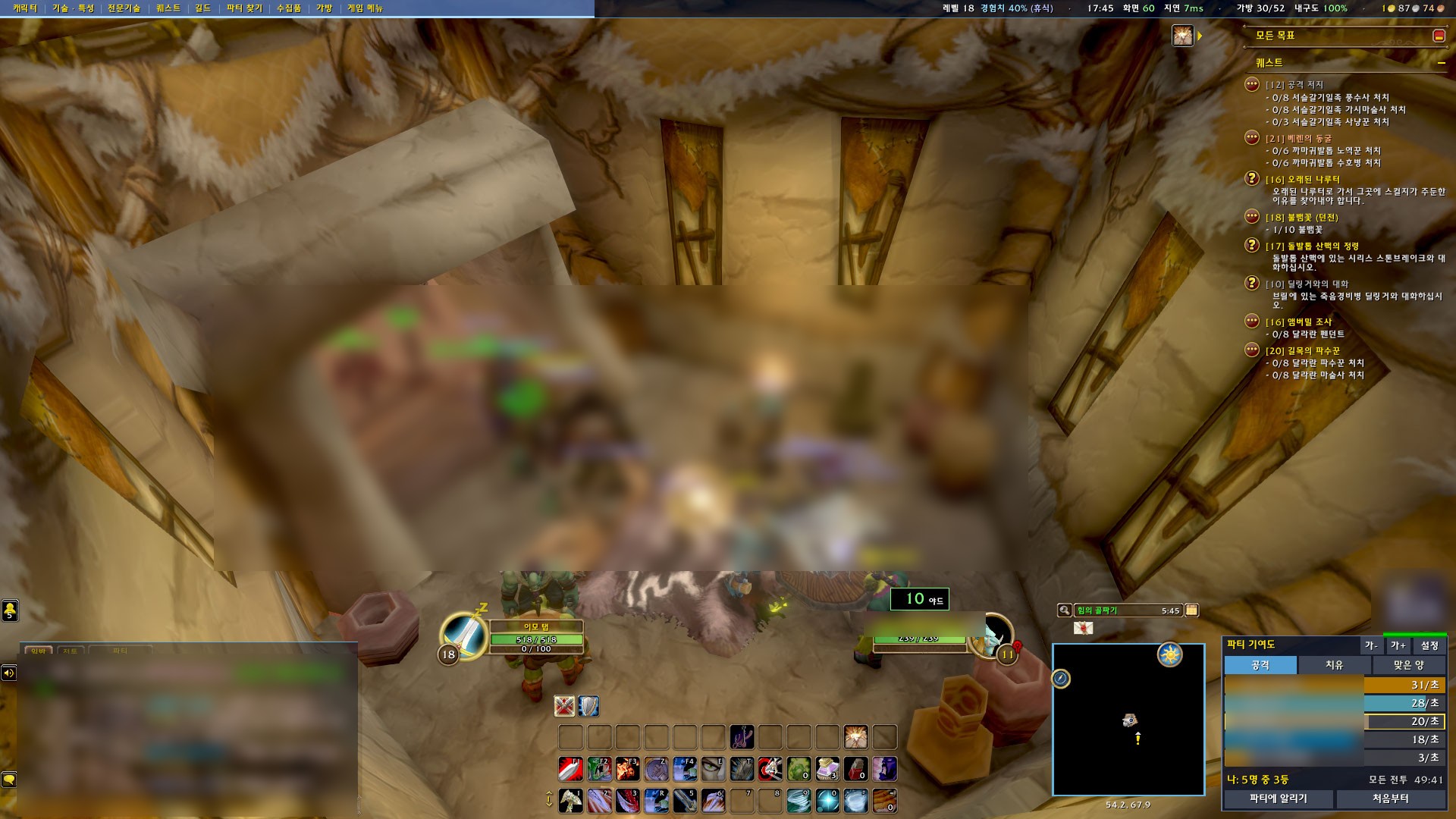
Party meter: [Damage] [Healing] [Taken] tabs, "Me: #2 of 5", top spells on hover, [Share to party] (like Details)
Easy settings: the most-used features as big ON/OFF switches in three groups, bigger/smaller text buttons
Guild price sharing: one guildmate at the AH updates prices for everyone online
Dungeon quest window: per-dungeon available / in progress / done quests with a guide arrow to the giver, chain quests step by step
Chat copy: copy chat text into a box (color codes removed, items as [name])
Crafting profit: material AH prices, total cost and product sale price (after the 5% cut) as profit/loss in the profession window; AH lowest price on tooltips
Quest item sparkles: the classic sparkle on quest objects and gatherables instead of outlines
Party greeting: auto hello when you join and welcome when someone joins (in their language too)
Change the game font
Foreign chat helper (game term glossary · off by default since 1.46.0, turn on in Settings)
Choose the minimap icon, move it anywhere
한국어 / English / 中文
Installation
CurseForge app (recommended)
Search for "Forever Assist" in the CurseForge app and install. Updates arrive through the app.
Manual install
Download the zip from CurseForge, extract it, and put the ForeverAssist folder in the path below.
Check in game
Make sure Forever Assist is enabled in the AddOns list on the character screen. Click the minimap button to open settings.
Install pathWorld of Warcraft\_classic_beta_\Interface\AddOns\ForeverAssist
Commands 50
/faShow all commands
/fa configOpen settings — the first "Easy settings" page has switches for common features (same as the minimap button)
/fa layoutTurn on the clean screen layout — /fa layout reset to go back (same as the Easy settings 3 "Screen layout" switch)
/fa minimap iconChange the minimap button icon
/fa minimap resetReset the minimap button position
/fa logCopy your game log (dungeons, today, level-ups) to paste on the Journal board
/fa errorOpen the error log (version, client, errors and how often they happened) to copy into a bug report. Clear it with /fa error clear
/fa homeOpen a copy-ready box with the homepage address
/fa copyOpen a copy box with chat text (or hover the chat for a [Copy] button)
/fa collect zoneCopy new-zone quest/NPC/flight point logs → upload to the homepage zone guide (off /fa collect zoneoff)
/fa markIn a dungeon, record the targeted boss, time and sub-zone with a screenshot
/fa shot [sec]Take a screenshot after a short delay (default 1 sec)
Use /fa or /포에버. Type /fa alone in game for the full list. English and Korean command names both work.
Patch notes
v1.60.0
Easy settings 4 · Party greeting (user request): write your own greeting text (%s = their name) · preview
Wait 0–10 sec before greeting (default 2) · [Vary a little] adds about ±1 sec each time
Toggle [Greet when I join] · [Welcome new members] · [Also greet in their language] separately
v1.59.3
Clean screen: the bag slot bar now appears just above the open bag window (or while holding an item) so you can swap bags
v1.59.2
Quest tracker: quests from sub-zone starting areas (e.g. Shadowglen) are no longer hidden as "other zone" (from a user report)
Class gauge: fewer false "No Battle Shout!" warnings
v1.59.1
Clean screen: the shaman totem bar now sits just left of the action bars instead of under the chat window (applied after combat · restored when the layout is turned off)
v1.59.0
Clean screen (bottom layout): Settings → Easy settings 3 → "Screen layout" — one switch to turn it on/off (off restores your original layout · needs a UI reload)
Action bars stacked bottom-center at 80% size (gryphons and borders removed) · chat bottom-left · square minimap + party meter bottom-right
Top bar: XP bar + level · time · bags · durability · gold, with a text menu on the left (Character · Spells/Talents · Professions · Quests · Guild · Group Finder · Collections · Bags · Game Menu)
Quest tracker top-right scrolls with the mouse wheel when long · tooltips appear above the party meter
Target-frame distance box (friendly/party targets) now sits just above the target frame so it no longer hides the power bar or buffs; resizable in the [Adjust] window
Chat copy button moved to the right end of the chat tab row
Clean screen — bars bottom-center, chat bottom-left, minimap + party meter bottom-right, top info bar with text menu
Community & support
Bugs & ideas
Type /fa error in game to open the error log, copy it, and paste it into a bug report. You will see which version fixes it. Feature requests go in Feature ideas.

 Forever Assist